Contact Custom Fields
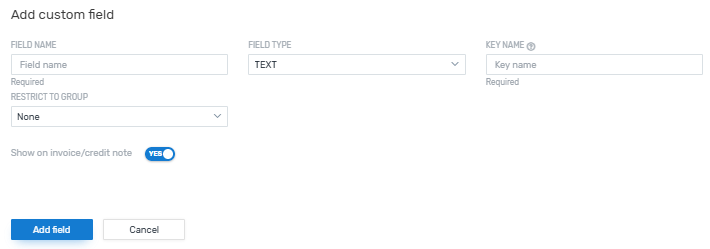
Custom fields for contacts are fields you can define and add yourself in Flywire Dashboard. You can use these fields for internal information about the customer or you can decide to make the field visible to your customers on their invoices and credit notes.
Adding custom fields
Once you’ve added a custom field and started using it for your customers, avoid deleting it. If you delete a field that already contains data for a contact, it can trigger errors later when you try to generate invoices for this contact.
Field Name
Choose a name for the field.
Field Type
Choose a type:
-
Text: A free text field. When you are filling out this field for a contact, you will see a field where you can enter any text.
-
Date: A date field. When you are filling out this field for a contact, you will see a date picker with a calendar.
-
List: A comma-separated list of values. When you are filling out this field for a contact, you will see a dropdown with the predefined values.
Key Name
The internal name of the field. It will be automatically generated from the field name, but you can edit it if needed.
Restrict to Group
Choose if this field should only be available for contacts in a specific group.
Show on invoice/credit note
Choose if this field will be visible to the customer on their invoices and credit notes.
Example:
|
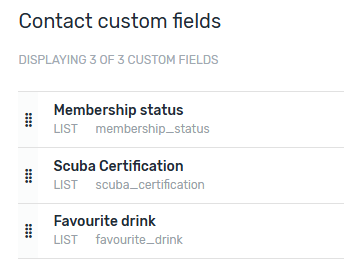
You have 3 custom fields in Flywire Dashboard. |
|
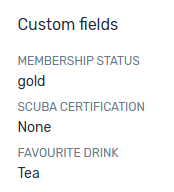
All of them are visible when you create contacts or view the contact information. |
|
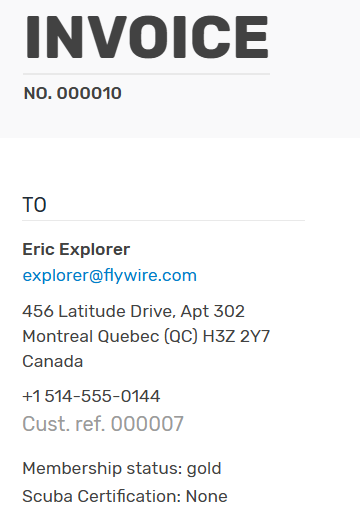
Only two of them are visible to the customer on their invoices and credit notes. |